How to use Microsoft Copilot for free: features and paid plans
What you can do with free Microsoft Copilot today. How to get started, how to use it in Edge, how it compares with the US Microsoft 365 plans, and the terms and privacy points to check before using it for work. We also check how our 2024 article, written in Japanese, holds up.
 By Jeensuk Yang
HowtoAI · AI assistants · Latest
?Who this is for
- You searched for how to use Copilot for free and want to know where to start
- Copilot looks different from what you remember, and you are not sure what changed
- You are wondering whether you can use Copilot for work, and whether you need a paid plan
!What you will learn
- What free Copilot can do as of October 2026
- How to get started, and how to use it in Edge
- How it compares with the US Microsoft 365 plans, and what to check before using it for work

Hi, I'm Hikari.
Microsoft Copilot has changed a lot since we wrote about it in 2024: how its products are named, how it looks, and what it costs. In this article I'll walk you through where Copilot stands now, how to start and use it for free, how it differs from the paid plans, and what to watch for before you use it at work. At the end, I'll check how our 2024 article holds up.
Where Copilot stands now (October 2026)
Copilot is the name of Microsoft's AI assistant, and you can still use it for free. The confusing part is that the same name covers a free app for individuals, paid features built into Microsoft 365 (Word, Excel and so on), and Microsoft 365 Copilot for organizations.
Since August 2026, the personal Copilot app and the work or school Copilot app have been one app. You can sign in with a personal Microsoft account or a work account (Microsoft Entra), and switch between them with the account switcher. The accounts themselves are not merged, and personal and work data stay separate.
According to Microsoft's support page, chat, image creation and file uploads are free when you use a personal Microsoft account. Higher usage and advanced features come with a Microsoft 365 subscription.
Here are the main events since our 2024 article, in order.
| When | What happened |
|---|---|
| Mar 2024 | We publish an article, in Japanese, on getting the most out of Copilot for free. At the time, you picked specialized assistants called Copilot GPTs. |
| Jul 10, 2024 | GPT Builder, the Copilot Pro feature for making your own Copilot GPTs, is retired. GPTs people had made are deleted. |
| Oct 2024 | Microsoft redesigns Copilot and announces voice conversations and Copilot Vision, which lets you talk about what is on your screen. Voice launches in English first. |
| Jan 2025 | Microsoft adds Copilot to Microsoft 365 Personal and Family and raises their prices for the first time. In the US, the increase is $3 a month. |
| Aug 2025 | GPT-5 comes to Copilot, including the free version. Smart mode, which picks a model to fit each question, arrives. |
| Oct 2025 | Microsoft 365 Premium launches at $19.99 a month, and Copilot Pro is no longer sold. |
| Aug 18, 2026 | Group Chat, Podcasts and Deep Research end in the consumer app. The personal and work apps continue to merge. |
| Sep 25, 2026 | Microsoft announces a new Copilot with Home, Code and Autopilot. Most of it starts in the Frontier program or limited previews. Microsoft says Code will be in preview for Microsoft 365 Premium and Pro subscribers later this year. |

HIKARI'S TAKECopilot is still free. But now that personal and work accounts live in the same app, it matters more to know which account you are using.
How to start using Copilot for free
You can use Copilot in a web browser, in the Windows and Mac apps, and in the phone apps (iPhone and Android). The same account works everywhere. If you are new to it, a browser on your computer is the easiest place to start.
- Open copilot.microsoft.com in your browser.Chrome, Safari, Edge or whatever you normally use is fine. Microsoft says web users are redirected to the new, merged version automatically.
- Sign in.Use your personal Microsoft account. The terms of use say that if you sign in with a non-Microsoft account, Microsoft may create a Microsoft account for you or link to an existing one.
- Check which account you are in.If you also have a work account, look at the account switcher and confirm whether you are in your personal or work account before you type anything.
- Type your question or request.Say what you want and who it is for, for example "Rewrite this as a polite email to a client." You get answers you can use more easily. You can also attach images and files.
- Don't use the answer as is.Check numbers, names and dates against the original source, such as an official website, before you use them.
The terms of use say you must be at least 13 (or older, depending on your country's laws) to use Copilot, and that some features may be turned off or limited if you are under 18.
HIKARI'S TAKEGetting started is just opening it in a browser and signing in. I'd make a habit of checking whether you are in your personal or work account before you type.
How to use Copilot: what the free version does
Here is what the free version can do, starting with the uses that help most with work and side projects.
1. Draft and rewrite text
Ask for a first draft of an email reply, an announcement or a product description. This is the easiest place to start. We suggest putting the draft into your own words before you send it.
2. Summarize images and documents
In our 2024 article, we showed how to turn a photo of a receipt into text. File uploads are still part of the free version. For example, attach a PDF and ask for "the key points in three lines," or attach a photo of a table and ask Copilot to "put this in a format I can paste into Excel."
3. Create images
Describe an image in words and Copilot will make it. This works well for illustrations in internal documents or for rough ideas. Section 05 covers what to watch for if the image will be seen outside your company.
4. Summarize the page you are reading in Edge
Copilot is built into Microsoft Edge. A guide from Mado no Mori, a Japanese tech news site (September 2025, based on the Japanese version of Edge), describes these steps. Menu names may differ slightly by language and Edge version.
- Summarize a page: With nothing selected, right-click the page and choose the option to summarize with Copilot. A side pane opens with the key points.
- Ask about selected text: Select some text or an image, right-click, and choose the option to ask Copilot.
- Polish what you wrote: Select text you typed in a text box, right-click, and choose the option to rewrite with Copilot. You can change the tone, the length and the format, such as email or bullet points.
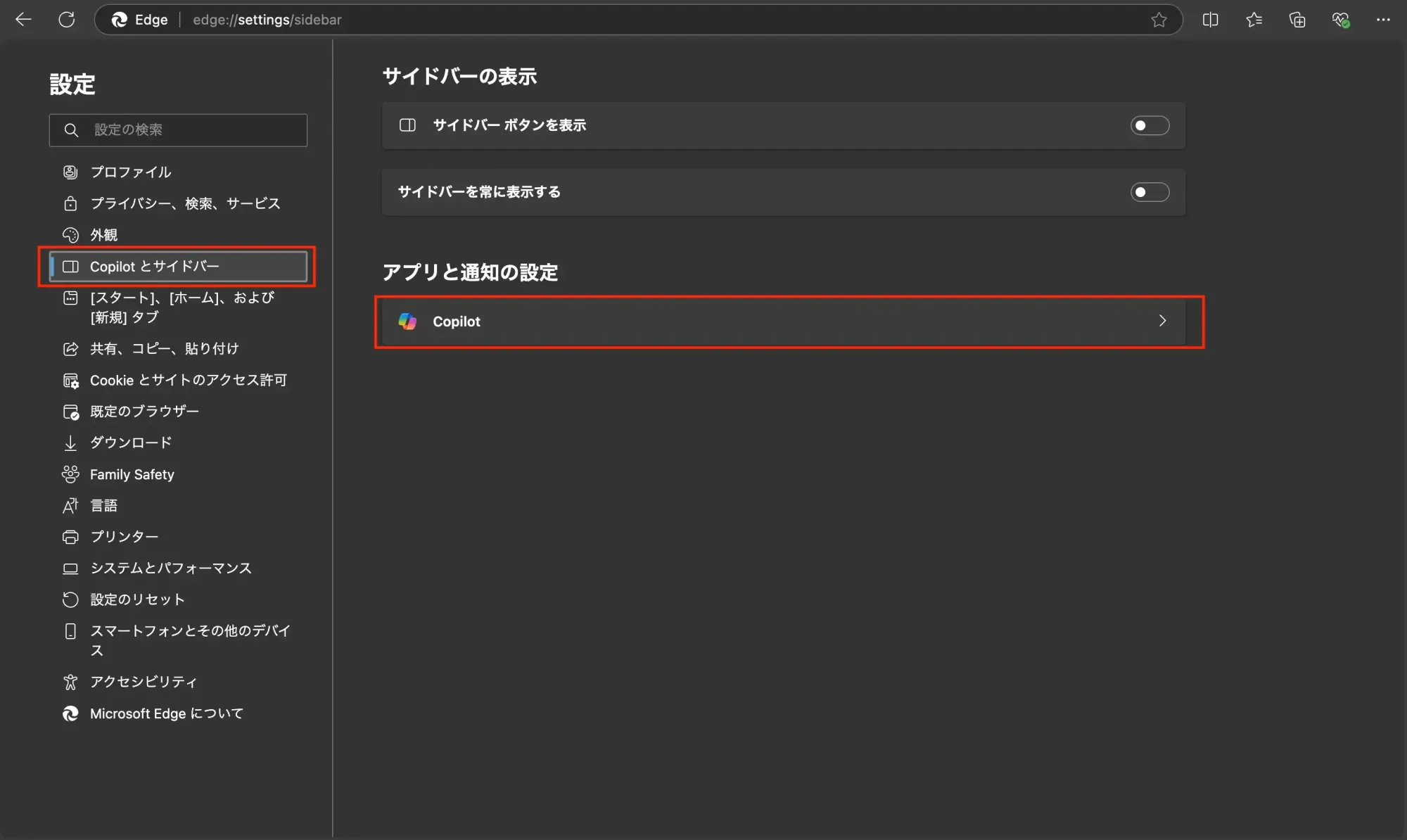
In our 2024 article, Edge's Copilot settings were under an item called "Copilot とサイドバー" (Copilot and sidebar) in the Japanese version. They are now gathered on one Copilot and AI settings page, which you can open by typing edge://settings/ai in the address bar.
HIKARI'S TAKEEven the free version covers writing, summarizing documents and making images. If you use Edge, the right-click summary is the easiest thing to try first.
Copilot pricing: free vs. paid plans
In 2024 we wrote that Copilot Pro was the way to get more. Microsoft stopped selling it in October 2025. If you want paid Copilot as an individual today, it comes as part of a Microsoft 365 plan. These prices are from Microsoft's US plans page, checked on October 26, 2026.
| Plan | Price | Copilot |
|---|---|---|
| Free | $0 | Chat, image creation and file uploads, with usage limits. |
| Microsoft 365 Personal | $9.99/month or $99.99/year | For one person. Copilot in the Word, Excel, PowerPoint and Outlook desktop apps. Higher usage than free. |
| Microsoft 365 Family | $12.99/month or $129.99/year | For up to six people, but only the subscription owner gets the AI features. |
| Microsoft 365 Premium | $19.99/month or $199.99/year | Everything in Family, plus much more Copilot usage and agents that carry out research and analysis for you. The successor to Copilot Pro. |
| Microsoft 365 Pro | $99.99/month (monthly billing only) | The highest usage limits. Listed on the official page. |
The plans page shows these prices with no note about sales tax. It also marks AI-generated audio as English only.
How to choose
- Try the free version first.If you mostly draft emails and summarize things, the free version is often enough.
- Choose Personal if you want Copilot inside Word and Excel.Being able to ask "Summarize this table" with the file open is the big difference from the free version.
- A family plan still means AI for the owner only.Upgrading to Family does not give each family member more Copilot.
HIKARI'S TAKEYou can't buy Copilot Pro anymore. The choice now is the free version or a Microsoft 365 plan, and the deciding question is whether you want Copilot inside Word and Excel.
Before you use Copilot at work: terms, rights and privacy
Our 2024 article covered only the useful features and said nothing about the terms or privacy. Here are the points in today's terms and help pages that matter if you use Copilot for work.
The consumer terms assume personal use
The Copilot terms of use for individuals (effective August 18, 2026) include this sentence.
You can only use Copilot for your own personal use.
The terms also say they do not apply to people who sign in with a work, school or organizational (Entra) account. If you want to use Copilot for work, the safe move is to check your company's policy first, and whether a Copilot is available through your company account.
Rights to the text and images you make
The terms say Microsoft does not own your content (your prompts and the responses), but may use it to operate and improve Copilot. They also say Copilot may give the same or similar responses and images to other people. Before you use a generated image on a product or flyer, check that it does not resemble a real person, an existing character, or another company's logo or work.
In the US, the Copyright Office said in January 2025, in Part 2 of its report on copyright and AI, that material generated entirely by AI is not protected by copyright, and that prompts alone usually do not make you the author. What you add yourself, such as your own edits or how you select and arrange the material, can be protected.
Your conversations may be used for training
Microsoft's privacy FAQ says that unless you opt out, your conversations with Copilot (including images and files you upload) are used to train its AI. The United States is not on its list of countries that are excluded. You can choose whether your data is used for training, and conversation history is kept for 18 months by default and can be deleted at any time.
- Don't put customer names, contact details or confidential documents into personal Copilot.
- Before you type, check whether the screen shows your personal or work account. Now that you can switch inside the same app, it is easier to mix them up.
- If you don't want your conversations used for training, turn it off in settings.
- Treat answers as drafts. The terms themselves say Copilot can make mistakes and should not be used as a substitute for professional advice.
HIKARI'S TAKEEven by its own terms, personal Copilot is a tool for personal use. Keep important work information out of it, and before you share an image you made, check that it doesn't look like someone else's work.
Checking our 2024 article
In March 2024 we published an article on getting the most out of Copilot for free, and later added a part on using it in Edge. Here is how what we wrote then holds up today.
| What we wrote | Looking back | Verdict |
|---|---|---|
| Copilot's basic features are free | Still free. You can chat, create images and upload files, with usage limits. | Right |
| Works at copilot.microsoft.com in any browser, including Chrome, Firefox and Edge | The web version still works in any browser. Windows, Mac and phone apps have been added. | Right |
| Built on OpenAI's GPT-4 | Correct at the time. Since August 2025 it picks a model for each question, GPT-5 included. | Accurate then |
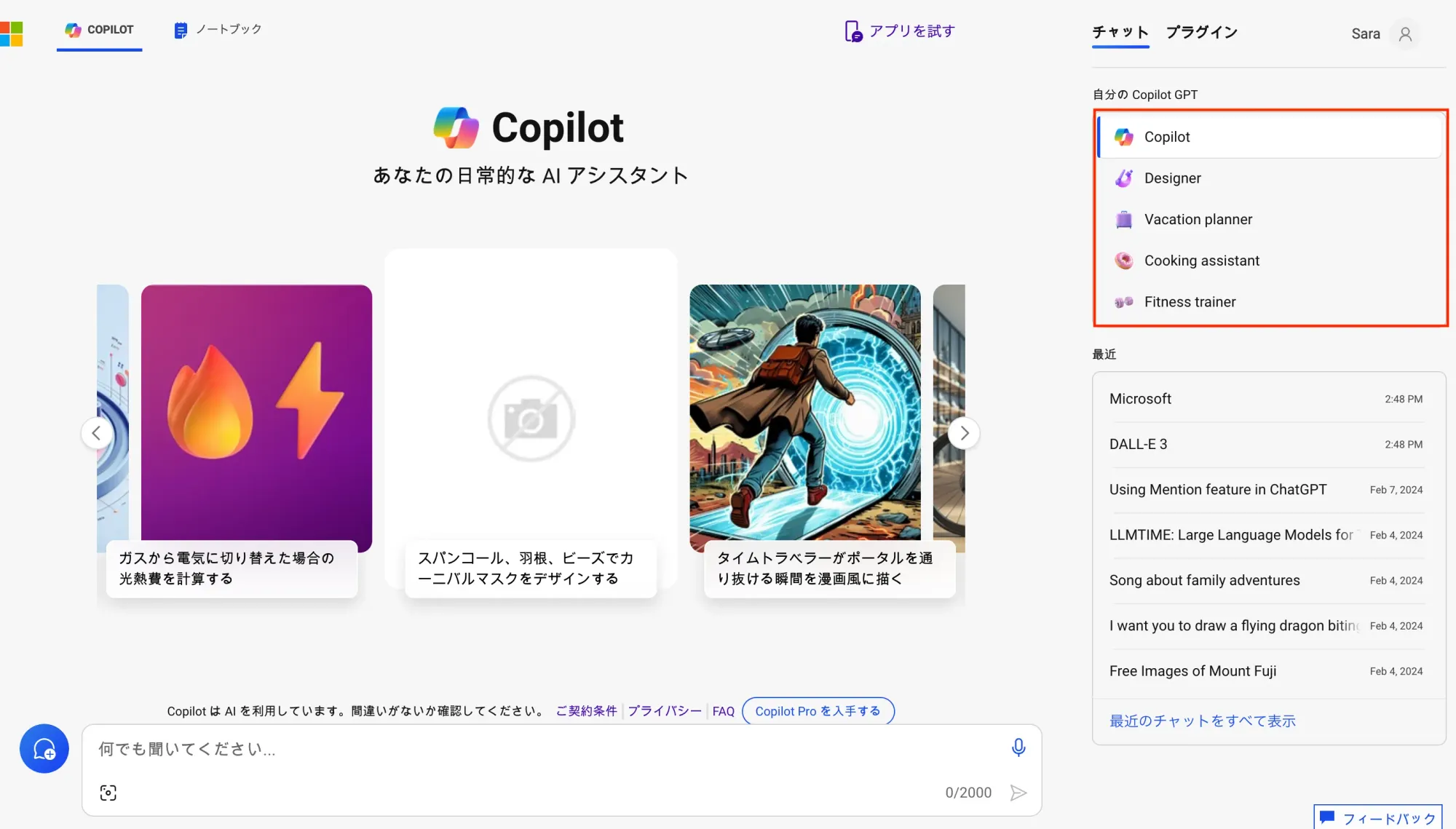
| You can pick specialized Copilots for free, such as Designer, Vacation planner, Cooking assistant and Fitness trainer. With Copilot Pro you can build your own with GPT Builder | GPT Builder ended in July 2024, and the GPTs people made were deleted. We found no mention of these specialized Copilots on the official pages we checked. | Not anymore |
| Advanced features need Copilot Pro | Copilot Pro stopped selling in October 2025. Those features now come with Microsoft 365 plans such as Personal and Premium. | Not anymore |
| Edge settings are under "Copilot and sidebar." You can summarize pages and pull text from images | Summaries and reading images still work. The settings moved to the Copilot and AI page. | Half right |
Our biggest miss was not writing a single line about the terms or privacy.
As the "for free" in our title suggests, we focused on listing what Copilot could do. But for readers using it at work, what mattered was what they could safely put in, and how far they could use what came out. That is why this article adds section 05.
HIKARI'S TAKEThe most important point, that Copilot is free to use, still holds. What we got wrong were the specialized Copilots and the paid plan names, and what we left out was the terms and privacy.
Common questions about using Copilot
Is Copilot still free?
Yes. Sign in with a personal account and you can chat, create images and upload files for free. Usage limits apply.
What happened to Copilot Pro?
Microsoft stopped selling it in October 2025. Its successor is Microsoft 365 Premium ($19.99 a month in the US). If you only want Copilot inside Word and Excel, Microsoft 365 Personal ($9.99 a month) includes it.
Can I use free Copilot for work?
The consumer terms say you can only use Copilot for your own personal use. For company work, check your company's policy first, and whether a Copilot is available through your work account. It is safest to keep customer information and confidential documents out of personal Copilot.
Can I use images I make with Copilot on flyers or products?
The terms say Microsoft does not own your content. They also say other people may get similar images. Check that an image does not resemble a real person, an existing character or another company's logo, and don't use it if you have doubts.
SOURCES
- Microsoft Support, "Copilot App Updates for Personal, Work, and School Accounts" (checked October 26, 2026) support.microsoft.com
- Microsoft, "Microsoft Copilot Terms of Use" (effective August 18, 2026, checked October 26, 2026) microsoft.com/en-us/microsoft-copilot/for-individuals/termsofuse
- Microsoft, "Microsoft Copilot Plans for Individuals" (US, checked October 26, 2026) microsoft.com/en-us/microsoft-copilot/for-individuals
- Microsoft Support, "Privacy FAQ for Microsoft Copilot" (checked October 26, 2026) support.microsoft.com
- Microsoft Support, "Microsoft Copilot for individuals: your privacy controls and choices" (checked October 26, 2026) support.microsoft.com
- Microsoft Copilot Blog, "Copilot is now included in Microsoft 365 Personal and Family" (January 16, 2025) microsoft.com/en-us/copilot/blog
- Microsoft Copilot Blog, "Meet Microsoft 365 Premium" (October 1, 2025) microsoft.com/en-us/copilot/blog
- Microsoft Copilot Blog, "Release notes: August 7, 2025" (August 7, 2025) microsoft.com/en-us/microsoft-copilot/blog (archived)
- Microsoft Source Asia, "Microsoft introduces a more personalized Copilot with voice and vision features" (October 9, 2024) news.microsoft.com/source/asia
- Redmond Channel Partner, "Microsoft To Wind Down GPT Builder" (June 12, 2024) rcpmag.com
- Mado no Mori (in Japanese, September 9, 2025), on using Copilot in Microsoft Edge forest.watch.impress.co.jp/docs/serial/yajiuma/2045499.html
- Mado no Mori (in Japanese, October 19, 2026), on Edge's redesigned Copilot new tab page forest.watch.impress.co.jp/docs/news/2149223.html
- NTT West Biz Clip (in Japanese, October 16, 2026), on the Copilot app merger business.ntt-west.co.jp/bizclip
- Official Microsoft Blog, "Introducing the new Copilot with Home, Code and Autopilot" (September 25, 2026) blogs.microsoft.com
- U.S. Copyright Office, "Copyright and Artificial Intelligence, Part 2: Copyrightability" (January 2025) copyright.gov/ai (PDF)
HowtoAI is the AI how-to series we have run in Japanese on multifverse.com since 2024. With our company now named ATATAKAI Digital, the series continues from October 2026 as one category of this blog. Thank you for reading, and we hope you will keep following along.
Which work should AI do, and how?
Is the free version enough? Which plan and which account should you use? We help you choose and use AI tools in a way that fits your work and your company's rules.
Talk to ATATAKAI Digital
Updated Oct 26, 2026
Read next

Google Whisk has shut down: our old how-to, and how to use Flow now
We rewrote our guide to Google Whisk now that the tool has ended. Whisk shut down on April 30, 2026, and its features moved to Google Flow. What happened, what our original article got right and wrong, and how to combine images in Flow now, with notes on rights.