
How to use Suno Covers: v6 steps, limits and the rights rules
How to use Suno's Covers feature under today's rules. We go through the steps in v6, pricing and download limits, and what the rights rules mean when you use a cover for work.
 By Jeensuk Yang
HowtoAI · AI music · Latest
?Who this is for
- You searched for how to use Suno Covers and want the current steps
- You want to turn your own song, or a melody you hummed, into a different genre
- You are wondering whether you can use a cover in a video or as background music for your business
!What you will learn
- Where the Covers feature stands as of October 2026, and how to use it
- The current rules on pricing, credits and download limits
- The rights rules for using a cover, and how our 2024 article holds up

Hi, I'm Hikari.
Suno's Covers feature still works in October 2026. But the model generation has changed, and so have the download limits and the rights rules. In this article I'll walk you through where Covers stands now, the steps, pricing and download limits, the rights rules for using what you make, and how our 2024 article holds up.
Where Suno Covers stands now
Suno's Covers feature keeps a song's melody and remakes it in a different genre or mood. It launched in September 2024 as an early-access beta for paying Pro and Premier subscribers.
As of October 2026 the feature is still there. It is now one part of a group of features Suno calls Remix. According to Suno's help center, Remix covers four workflows: Cover, Extend (which makes a song longer), Reuse (which reuses a prompt) and Speed (which changes the tempo).
Over the past two years, the rules around the feature changed more than the feature itself. Here are the main events in order.
| When | What happened |
|---|---|
| Jun 2024 | Universal Music Group (UMG), Sony Music and Warner Music Group (WMG) sue Suno in federal court in Massachusetts, saying it trained on their recordings without permission. |
| Sep 12, 2024 | Covers launches as an early-access beta. Pro and Premier subscribers get the first 200 covers free, then 10 credits each. Our original article, written in Japanese, was based on this announcement. |
| Nov 2025 | Suno partners with WMG and settles WMG's copyright lawsuit. It says it will launch new licensed models in 2026 and retire the current ones, and that songs made on the free plan will no longer be downloadable. |
| Apr 2026 | A test by The Verge shows that Suno's copyright filter on uploaded audio can be passed with simple edits such as changing the speed. |
| Around Jul 31, 2026 | In Germany, the Munich Regional Court rules for the music rights society GEMA and finds that Suno infringed copyright in six songs. The ruling is not final, and Suno says it is weighing an appeal. |
| Aug 6, 2026 | Suno announces audio watermarking and fingerprinting for generated songs. It says it will check uploaded audio and lyrics with outside companies such as Audible Magic and Musixmatch. |
| Sep 3, 2026 | Download limits and new Terms of Service take effect. |
| Sep 9, 2026 | Suno releases a new model, v6, which it says it developed with WMG, BMG and Believe. All earlier models are retired. |
| Sep 2026 | UMG and Sony file a new lawsuit in Massachusetts, arguing that v6 was trained on the output of earlier models and still infringes. The 2024 case is still in court. |

HIKARI'S TAKECovers hasn't gone away. It's now part of Remix, and it runs on the v6 model. What changed the most are the rules on downloads and rights.
How to use Suno Covers (steps as of October 2026)
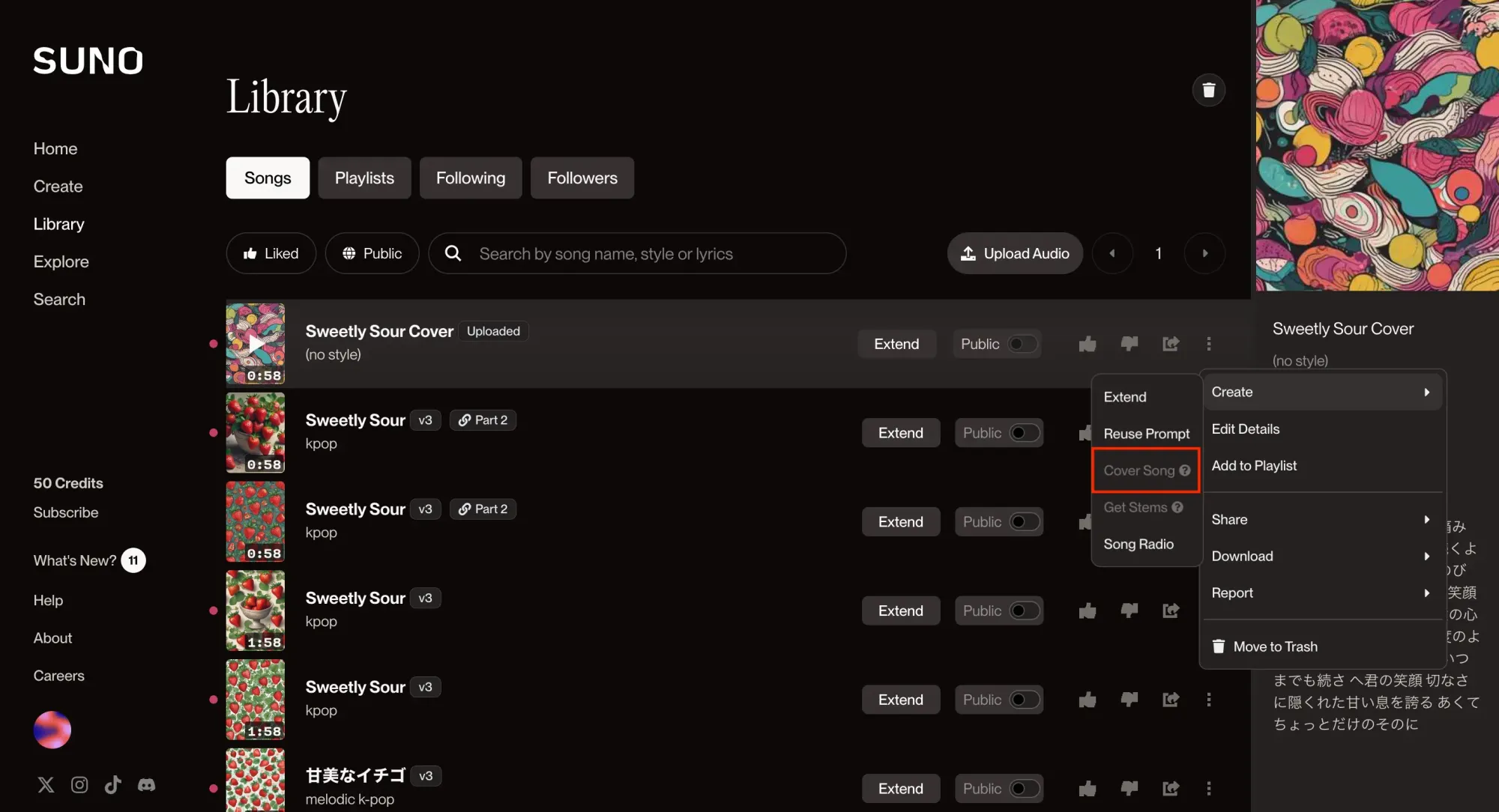
Suno's help center describes making a cover on the web like this.
- Pick the song to start from in your library. Use a song you made with Suno, or audio you uploaded yourself.
- Click "…" (More Actions), then choose "Cover Song" under "Create".
- Write the new style in "Style of Music". List the genre, instruments and voice in a few words, for example "acoustic, bossa nova, soft female vocal". Change the title if you like, then click "Create".
- Listen to both and keep the better one. Each generation gives you two songs. The result is not always what you expected, and the help center assumes you may need a few tries.
With v6, a few things about using it changed as well. Here are the points from the help center's "v6 FAQ" that relate to covers.
| What changed | Details |
|---|---|
| Just ask in words | In Simple mode, you don't have to choose between cover, remix and extend. v6 works it out from what you ask for. |
| Mix your inputs | You can put Suno songs, playlists, uploaded audio, images and video into a single prompt. |
| Max Mode | Uses more credits, but is recommended when you want a cover that stays close to the original. |
| Songs from older models | You can cover songs made with models before v6. The new version is generated with v6, and the original stays as it is. |
To start from your own humming or playing, use "Audio Upload" on the create screen to record on the spot or load a file. Uploaded audio is saved to your library, and you can use it as the basis for a cover later.
HIKARI'S TAKEThe flow is almost the same as in 2024: pick a song and write a new style. I find it handy to remember this: Max Mode when you want to stay close to the original, Simple mode when you just want to try something.
Suno pricing, credits and download limits
Here is a summary of Suno's pricing page and the download policy announced in August 2026. Prices are in US dollars, and we checked the pricing page on October 26, 2026. The page says taxes are calculated at checkout.
| Plan | Price | Credits | Downloads | Commercial use |
|---|---|---|---|---|
| Free | $0 | 50 a day | Users who signed up before Sep 3, 2026 get 7 trial downloads in total (personal use only) | No |
| Pro | $10/month ($8/month billed yearly) | 2,500 a month | 20 songs a month | Yes |
| Premier | $30/month ($24/month billed yearly) | 10,000 a month | 60 songs a month (exports from Suno Studio are unlimited) | Yes |
You can buy extra downloads beyond the limit. In the US App Store, the official app lists in-app purchases including "Pro Plan" at $10.00 and $96.00, "Premier Plan" at $30.00 and $289.00, and single download credits at $2.99 and $4.99 (the store does not show billing periods; checked October 26, 2026).
A song generation with v6 costs 10 credits and gives you two songs. In the 2024 announcement, a cover cost the same 10 credits as a new song. Max Mode costs more. On the free plan you can only use v6-mini. Pro and Premier can also choose v6 and v6-wild, which gives looser, more unexpected results.
The download limits also apply to songs made before September 3, 2026. On every plan, you can still play and share your songs on Suno and use them as the basis for covers and remixes. Under the Terms of Service you must be at least 13 to use Suno, and users under 18 need a parent or guardian's consent.
HIKARI'S TAKEThe number to watch now is how many songs you can download, not how many you can make. Even Pro gets 20 a month, so choose the songs you want to keep before you save them.
Can you use a Suno cover? (rights and commercial use)
A cover only exists because there is an original song. That is why who owns the original makes a big difference to what you can do with the cover. Based on the Terms of Service that took effect on September 3, 2026, and Suno's help center, here are four common cases.
| Original song | Can you cover it? | Commercial use |
|---|---|---|
| A song you made with Suno | Yes | Yes, if both the original and the cover were made while you had a paid plan, and you saved them within your download limit. |
| A song someone else published on Suno | Only if its creator turned on "Allow Remixes". The cover links back to the original. | No. Even on a paid plan, use is limited to personal, non-commercial use. |
| A recording of a song you wrote and performed yourself | Yes, you can upload it and cover it. | Yes, if you made and downloaded it on a paid plan. This assumes you own the rights to the audio you uploaded. |
| A commercial release, or a recording of someone else's song | No. Uploading it is banned by the terms. | No. |
Under the Terms of Service, you promise that you have the rights or permission needed for any audio you upload. You may not upload anything that infringes someone else's intellectual property. In August 2026, Suno said it would check uploaded audio and lyrics with outside companies. Yet in April, there were reports of simple edits, such as changing the speed, getting past the filter.
Being able to upload something is not permission to use it.
A word on how this looks in the US. The question of whether Suno itself infringed is being fought in federal court in Massachusetts, where UMG and Sony's 2024 case is still going and a new case over v6 was filed in September 2026. For your own use, the simpler point is this: a cover is designed to keep the original's melody. If the original is someone else's song, treat the cover like any other version of their work, and assume you need their permission.
Also, having commercial rights on a paid plan does not mean your song is protected by copyright. In its January 2025 report on copyrightability, the U.S. Copyright Office said AI output can be protected only where a human author determined enough of the expressive elements, and that simply writing prompts is not enough. Suno's Terms of Service also make no promise that copyright exists in what you generate. For the voice feature, the terms say you may only register your own voice.
HIKARI'S TAKEThe covers you can use with peace of mind are the ones made from your own songs or your own recordings. If a cover is based on someone else's song, keep it for your own enjoyment.
Checking our 2024 article on Suno Covers
In September 2024, right after Covers launched, we published an article on its features and how to use it, in Japanese. Here is how what we wrote then holds up today.
| What we wrote | Looking back | Verdict |
|---|---|---|
| A feature that keeps the melody and changes the style | The current help center describes it the same way. | Right |
| For Pro and Premier subscribers. The first 200 are free, then 10 credits each | Matched the official announcement at the time. The current help center only says "the first batch" is free, with no number. | Accurate then |
| Choose "Cover Song" from the "…" menu | The help center's steps are still the same. With v6, if you ask in Simple mode, the AI decides whether to make a cover. | Half right |
| Anything from a voice memo to a finished track can be given a new style | Your own recordings and your own songs still work. Uploading other people's songs is banned by the terms. | Half right |
| Because it is a beta, the original sometimes comes back almost unchanged | The help center still calls it a beta and assumes you may need a few tries. | Right |
| More new features will keep coming | v6 added editing parts of a song and mashups that combine several songs, among other things. | Right |
| Said nothing about how you can use what you make | Commercial use is now limited to songs downloaded within your limit, and covers of other people's songs are non-commercial only. | Different now |
Our biggest miss was not saying whose songs you are allowed to cover.
Our original article described Covers as being like dressing a favorite song in new clothes. It is natural for readers to want to try it on a song by an artist they love. But on Suno, the only songs you were ever allowed to use were ones you held the rights to. We should have said that as clearly as we described the fun of the feature.
HIKARI'S TAKEThe features and prices were right for the time. What was missing was who owns the original, and how you can use what you make. That is what we regret most.
A checklist before using Suno Covers for work or a side business
When we use a cover as video background music, music played in a shop, or a theme song for an event, we try to check these things in this order.
- Make sure the original is yours. Only use songs you wrote, your own recordings, or songs you made on Suno.
- Make it while you are on a paid plan. Songs made on the free plan are limited to personal, non-commercial use.
- Download only the songs you will use, through the official download. Only songs downloaded within your limit can be used commercially. Recording or ripping audio while it plays is banned by the terms.
- Don't use real singers' names or other people's voices. Even if a prompt meant to imitate someone works, don't use the result for work.
- Keep records. Note the original song, the prompt, the date you made it, the plan you were on, and the date you downloaded it. Then you can explain it if anyone asks.
- Keep the files yourself. Suno's models and terms have changed several times in two years. Save the songs you use to your company drive too.
HIKARI'S TAKEThe original is yours, you make it while on a paid plan, and you download the songs you use the official way and keep them. Stick to those three and you'll avoid most trouble.
Common questions about Suno Covers
Can I use Suno Covers for free?
The help center's "What is a Cover?" says it is for Pro and Premier subscribers. The audio upload article, though, says free users can make covers, so the two don't agree. Songs made on the free plan can't be used commercially and have limited downloads, so for work you will need a paid plan.
Can I upload a song by an artist I like and make a cover of it?
No. Suno's Terms of Service ban uploading audio you don't have the rights to, or audio that infringes someone else's copyright. Even if an upload gets past the filter, that does not make it OK to use.
Can I monetize a cover of someone else's Suno song on YouTube?
No. You can cover songs whose creators turned on "Allow Remixes", but even on a paid plan, use is limited to personal, non-commercial use.
Can I cover songs I made with older models in 2024?
Yes. The models before v6 are retired, but your songs stay in your library, and you can cover or remaster them. The new version is generated with v6.
SOURCES
- Suno, "Introducing Covers" (September 12, 2024) suno.com/blog/covers
- Suno Help Center, "What is a Cover?" (checked October 26, 2026) help.suno.com/en/articles/2872257
- Suno Help Center, "Remix FAQ's" (checked October 26, 2026) help.suno.com/en/articles/5663873
- Suno Help Center, "v6 FAQ" (checked October 26, 2026) help.suno.com/en/articles/13924481
- Suno Help Center, "How to Use: Audio Uploads" (checked October 26, 2026) help.suno.com/en/articles/6141569
- Suno, "Pricing" (checked October 26, 2026) suno.com/pricing
- Suno, "Terms of Service" (revised August 10, 2026, effective September 3, 2026; checked October 26, 2026) suno.com/terms
- Suno, "An update to our downloads policy and Terms of Service" (August 10, 2026) suno.com/blog/suno-updates-tos
- Suno, "Introducing v6" (September 9, 2026) suno.com/blog/introducing-v6
- Music Business Worldwide, "Suno limits Pro subscribers to 20 song downloads per month" (August 11, 2026) musicbusinessworldwide.com
- Music Week, "Warner Music Group settles lawsuit and signs AI licensing deal with Suno" (November 26, 2025) musicweek.com
- Music Business Worldwide, "Warner Music Group settles with Suno, strikes first-of-its-kind deal with AI song generator" (November 25, 2025) musicbusinessworldwide.com
- Engadget, "Suno is adding audio watermarks so AI-generated songs are more easily identifiable" (August 6, 2026) engadget.com
- heise online, "Suno: Copyright blocks for AI music are easy to bypass" (April 7, 2026) heise.de/-11246932
- t-online (in German, July 31, 2026) t-online.de
- Variety, "Sony Music, Universal Music Group Sue Suno Over Label-Backed Model" (September 19, 2026) variety.com
- Music Business Worldwide, "Judge clears UMG and Sony to accuse Suno of pirating YouTube via 'stream ripping' to train its AI" (August 27, 2026) musicbusinessworldwide.com
- App Store, "Suno - AI Songs, Music, Lyrics" (US, checked October 26, 2026) apps.apple.com/us/app/id6480136315
- U.S. Copyright Office, "Copyright Office Releases Part 2 of Artificial Intelligence Report" (January 29, 2025) copyright.gov/newsnet/2025/1060.html
- U.S. Copyright Office, "Copyright and Artificial Intelligence" (checked October 26, 2026) copyright.gov/ai
HowtoAI is the AI how-to series we have run in Japanese on multifverse.com since 2024. With our company now named ATATAKAI Digital, the series continues from October 2026 as one category of this blog. Thank you for reading, and we hope you will keep following along.
Use what you make with AI at work, with confidence.
The rules for AI tools change almost every year. We help you work out which tool to use for which task, and how to manage what you make, based on how your business runs.
Talk to ATATAKAI Digital
Updated Oct 26, 2026
Read next
Google Whisk has shut down: our old how-to, and how to use Flow now
We rewrote our guide to Google Whisk now that the tool has ended. Whisk shut down on April 30, 2026, and its features moved to Google Flow. What happened, what our original article got right and wrong, and how to combine images in Flow now, with notes on rights.
ChatGPT vs Gemini vs Copilot vs Perplexity vs DeepSeek (2026)
We compared ChatGPT, Gemini, Copilot, Perplexity and DeepSeek again, as they are today. How to read the DISC personality comparison from our earlier article, what each AI is good for now, how to set the tone yourself, and what to check before using them at work.