How to create and edit images in ChatGPT, now that DALL·E is gone
ChatGPT now makes images with ChatGPT Images 2.5. How to create images in chat, how to edit part of an image, what the free and paid plans include, and what to watch for with commercial use and copyright. We also look at what happened to DALL·E.
 By Jeensuk Yang
HowtoAI · AI images · Latest
?Who this is for
- You want to know how to create or edit images in ChatGPT
- You used DALL·E to make images and wonder what happened to it
- You want to try making shop flyers or social posts with ChatGPT
!What you will learn
- How ChatGPT image generation (ChatGPT Images 2.5) works as of October 2026
- How to change just part of an image, and what the free and paid plans include
- What to watch for with commercial use and copyright, and how our 2025 article holds up
Hi, I'm Hikari.
Anyone can still make images in ChatGPT. But since we wrote about it in 2025, both the model behind it and the screens have changed a lot. In this article I'll walk you through how it works now, how to make and fix images, how the plans differ, and what to watch for with rights. At the end, we'll check what our original article got right.
Where ChatGPT image generation stands now
As of October 2026, image generation in ChatGPT is a feature called ChatGPT Images. It runs on ChatGPT Images 2.5, a model released on September 8, 2026. It is available on every plan, including Free, on the web, iOS and Android.
When we wrote about this in April 2025, image generation with GPT-4o had just launched, and the older DALL·E 3 was still around. Here is what happened after that.
| When | What happened |
|---|---|
| Oct 2023 | DALL·E 3 is built into ChatGPT (beta). |
| Aug 2024 | Free users can make up to two images a day with DALL·E 3. |
| Mar 25, 2025 | GPT-4o image generation becomes ChatGPT's default. A "DALL·E GPT" stays available for people who want DALL·E. Our April 2025 article, written in Japanese, dates from this time. |
| Apr 15, 2025 | A "Library" for browsing your images is added to the sidebar. |
| Dec 16, 2025 | A new ChatGPT Images launches. Images you make are saved automatically to "My images" (chatgpt.com/images). |
| Apr 21, 2026 | ChatGPT Images 2.0 launches, with much better text rendering, including non-Latin scripts. Paid plans get "images with thinking," which plans the layout before generating. |
| May 12, 2026 | DALL·E 2 and DALL·E 3 are shut down in the developer API. |
| Aug 30, 2026 | The official DALL·E GPT in ChatGPT is retired. |
| Sep 8, 2026 | ChatGPT Images 2.5 launches, adding templates, sketch-to-image, and comments you can leave on an image to request changes. |

HIKARI'S TAKEAny image you make in ChatGPT today comes from Images 2.5. You can't pick DALL·E anymore, so there's no longer a choice to agonize over.
How to create images in ChatGPT
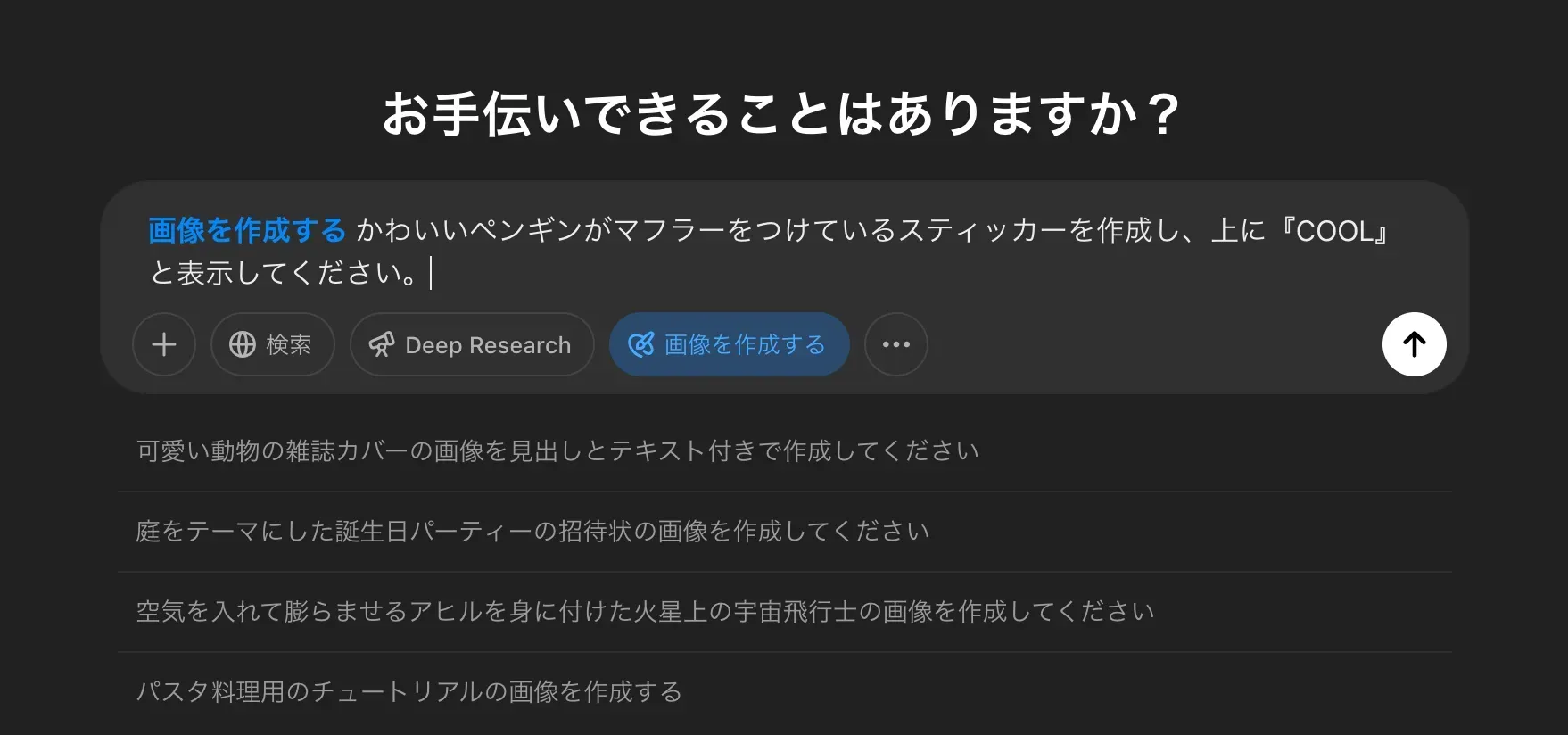
The basics are the same as in 2025: describe the image you want. What's new is that there are more ways to start. Here are the steps, based on OpenAI's help center (checked October 26, 2026).
- Ask in the chat.Type something like "Make an image of…" in the usual message box, and ChatGPT creates it.
- Start from Images.Open "Images" from the sidebar or "More," and enter a prompt. Everything you've made so far is collected there too.
- Use a template.Go to Images, then Templates, pick a starting point such as a poster or logo, and fill in the details. If ChatGPT asks follow-up questions, choose an option or type your own answer.
- Start from a sketch (mobile).In the app, type "@" in the message box, choose Sketch, draw, and then describe the image you want.
- Set the aspect ratio.Use the aspect ratio picker, or write something like "16:9" in your prompt.
Depending on the request, an image can take a few minutes. You can keep using ChatGPT while you wait.
How to write prompts that get you closer
Based on OpenAI's help center and announcements, here is what helps most for work images.
- Say what the image is for.For example, "a letter-size flyer for the shop window" or "a square Instagram post." The help center also suggests stating the purpose and the exact wording for posters.
- Put any text you want in quotation marks, word for word.OpenAI says text rendering improved a lot with Images 2.0. Long sentences and small type can still come out wrong, so zoom in and check the result.
- If you want a transparent background, say so.ChatGPT supports it.
- If you have a reference photo, upload it first.OpenAI says Images 2.5 keeps the subject of a reference photo more faithfully.
HIKARI'S TAKEStart by simply asking in the chat. Once you're comfortable, try templates and aspect ratios. For images with text, zoom in and check every word.
How to edit images in ChatGPT
You can edit both images you made in ChatGPT and photos you took yourself. There are two main ways.
Edit by describing the change
Select an image or upload a photo, then describe what you want changed. Naming the spot, as in "make the background white" or "remove the logo in the top right," makes it more likely to come out the way you want. OpenAI says Images 2.5 holds on to earlier changes better across several rounds of edits.
Select an area to edit (the editor)
Select an image in a conversation or in Images in the sidebar, and the editor opens. Here is what it can do.
| Button | What it does |
|---|---|
| Select | Brush over the part you want to change, then describe the change. |
| Aspect ratio | Regenerates the image in a different aspect ratio. |
| Undo / Redo | Steps your selection back, or redoes what you undid. |
| Cancel | Starts over. |
| Save | Finishes editing. |
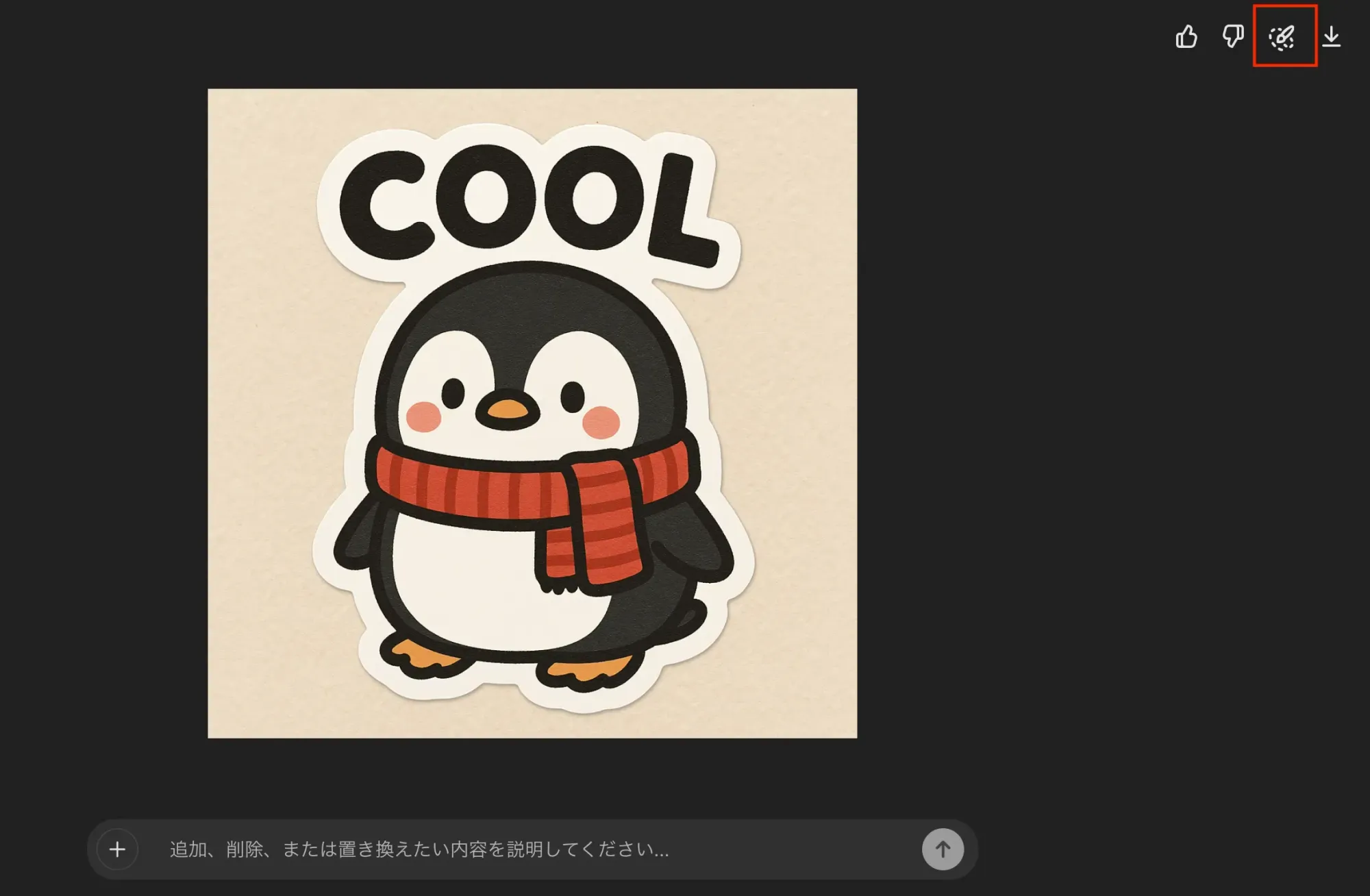
Edit on your phone
In the app, tap an image to open it full screen. Tap Edit to describe a change, or tap Select to brush over an area. Use the slider to change the brush size, tap Next, and describe the change. On mobile you also get Resize and Remove tools, and you can leave comments directly on the image to point out what should change.
HIKARI'S TAKEUse the chat for small fixes and the editor when you want to change a specific spot. And save the original to your own device first, just in case.
ChatGPT image generation: free and paid plans
You can make images on the Free plan. What changes by plan is how many you can make, and whether you get the feature that plans the layout before generating. The table uses the wording on OpenAI's US pricing page and the US prices from OpenAI's help center and announcements (checked October 26, 2026).
| Plan | Monthly price | What it says about images |
|---|---|---|
| Free | $0 | Limited image creation |
| Go | $8 | More image creation. May include ads |
| Plus | $20 | More complex and accurate image creation. Includes images with thinking |
| Pro | From $100 | Unlimited and faster image creation (subject to abuse guardrails). Choose from three tiers: Pro 100 ($100), Pro 200 ($200) and Pro 500 ($500) |
Images with thinking, which plans the layout before it generates, is available on Plus, Pro and Business, and OpenAI says Enterprise and Edu are coming soon. When it announced Images 2.0, OpenAI said this feature can produce up to eight related images from a single request.
Go is OpenAI's low-cost plan. On January 16, 2026, it became available everywhere ChatGPT is offered, including the US, where it costs $8 a month. Ads appear only on the Free and Go plans; Plus and Pro stay ad-free. Prices can change, so check the pricing page before you subscribe.
HIKARI'S TAKETry the Free plan first, and think about Go or Plus once you're making a lot of images for work. Prices change often, so take a look at the pricing page before you sign up.
Commercial use and copyright for images made in ChatGPT
Our 2025 article said almost nothing about rights. If you use these images for work, this is the part that matters most.
Who owns the images you make
OpenAI's Terms of Use (effective January 1, 2026) say that, to the extent the law allows, you keep ownership of your input and you own the output, including the images you make. The same terms also say that, because of how AI works, other users may receive similar output. Owning an image and that image being unlike anything else are two different things.
Owning an image also does not mean it is protected by copyright. In its January 2025 report on copyrightability, the U.S. Copyright Office concluded that prompts alone do not make an AI output protectable. Protection can cover what a human contributes, such as a human-made work that is visible in the output, or creative arrangement or changes to it.
Don't use images that resemble existing works or real people
As a general rule of U.S. copyright law, an image that copies protected parts of an existing work can infringe on it, whether a person or an AI made it. This is general information, not legal advice. For images of real people, OpenAI says it has tightened what can be created.
Images record that they were made with AI
Images made in ChatGPT carry two signals: metadata that shows where they came from (C2PA) and an invisible watermark (SynthID). You can upload an image at openai.com/verify to check whether it was made with OpenAI's tools. OpenAI also notes that these signals do not guarantee that the content is accurate or that anyone holds the rights to it.
If you don't want your photos or prompts used to train OpenAI's models, you can turn that off in settings on any plan.
- Don't steer toward existing characters, logos or a specific artist's style.If the result ends up looking like something else, don't use it.
- Use photos of real people only with their permission.That includes your employees and customers.
- Have a person check text, numbers and maps in the image.A polished look does not mean the content is right.
- Have a second person review anything public, such as ads or packaging.Don't leave the call to the person who made it.
- Save the images you use to your own drive.To remove an image from Images in ChatGPT, you have to delete the whole conversation that created it.
HIKARI'S TAKEThe images you make are yours, but that doesn't make it fine to use one that looks like someone else's work. Run through the five points above before anything goes public.
Checking our 2025 article
In April 2025, right after GPT-4o image generation launched, we published a guide to this feature in Japanese. Here is how what we wrote then holds up today.
| What we wrote | Looking back | Verdict |
|---|---|---|
| Available on Free, Plus, Team and Pro, but not yet on Enterprise or Edu | Matched the official announcement at the time. It is now available on every plan, including Free. | Accurate then |
| Just ask, "Make an image of…" | Still true. There are now more ways to start, such as templates and sketches. | Right |
| You can select an area to edit, and adjust with Undo, Redo and Cancel | The editor basics are unchanged. Aspect ratio changes and comments on mobile were added. | Right |
| You can make the background transparent | Still supported. | Right |
| Complex prompts take up to about two minutes | The help center now says it "may take a few minutes." OpenAI says Images 2.5 is up to 50% faster than 2.0. | Half right |
| If you want DALL·E, you can use the DALL·E GPT | The DALL·E GPT was retired on August 30, 2026. DALL·E in the API ended on May 12. | No longer true |
| The "Created with DALL·E" label under an image tells you which model made it | There is no longer anything to tell apart. Whether an image was made with AI is now checked with C2PA and a watermark. | No longer true |
Our biggest miss was saying nothing about rights when you use these images for work.
The original article said the images were handy for social media and stickers, but never covered who holds the rights or what to do if a result looks like something else. Around the same time, another of our articles (also in Japanese) explained how to make images in the style of a famous animation studio. Reading it again now, rights were the point that mattered most to users.
HIKARI'S TAKEThe how-to mostly still works. What changed was DALL·E, and what was missing was rights. This article fills that gap.
Common questions about ChatGPT image generation
Can I still use DALL·E in ChatGPT?
No. The official DALL·E GPT was retired on August 30, 2026, and OpenAI's help center says to use ChatGPT Images to create and edit images. GPTs with image generation turned on in their settings now use the new model.
Can I make images on the Free plan?
Yes. The pricing page lists the Free plan as "Limited image creation," without a specific number. If you need more, Go and Plus raise the limits.
Can I use images made in ChatGPT commercially?
OpenAI's Terms of Use say you own the images you make. But an image that resembles an existing work or a real person can infringe on someone's rights, and in the US, AI output from prompts alone is not protected by copyright. Have a person check anything before it goes public.
Can ChatGPT put readable text in an image?
Yes. OpenAI says Images 2.0, released in April 2026, made text rendering much stronger, including for non-Latin scripts. Long sentences and small type can still come out wrong, so zoom in and check.
SOURCES
- OpenAI Help Center, "Images in ChatGPT" (checked October 26, 2026) help.openai.com/en/articles/11084440
- OpenAI Help Center, "ChatGPT release notes" (archived October 21, 2026) help.openai.com/en/articles/6825453
- OpenAI, "Introducing ChatGPT Images 2.5" (September 8, 2026) openai.com/index/introducing-chatgpt-images-2-5
- OpenAI, "Introducing ChatGPT Images 2.0" (April 21, 2026) openai.com/index/introducing-chatgpt-images-2-0
- OpenAI, "Introducing 4o Image Generation" (March 25, 2025) openai.com/index/introducing-4o-image-generation
- OpenAI, "Deprecations" (checked October 26, 2026) developers.openai.com/api/docs/deprecations
- ChatGPT, "Pricing" (US page, archived October 25, 2026) chatgpt.com/pricing
- OpenAI Help Center, "What is ChatGPT Plus?" (checked October 26, 2026) help.openai.com/en/articles/6950777
- OpenAI Help Center, "About ChatGPT Pro tiers" (checked October 26, 2026) help.openai.com/en/articles/9793128
- OpenAI, "Introducing ChatGPT Go, now available worldwide" (January 16, 2026) openai.com/index/introducing-chatgpt-go
- OpenAI, "ChatGPT Ads expands to 26 new countries" (October 21, 2026) openai.com/index/chatgpt-ads-expands-26-new-countries
- App Store (US), "ChatGPT" in-app purchases (checked October 26, 2026) apps.apple.com/us/app/chatgpt/id6448311069
- OpenAI, "Terms of Use" (effective January 1, 2026, checked October 26, 2026) openai.com/policies/terms-of-use
- OpenAI Help Center, "Provenance signals in OpenAI-generated content" (checked October 26, 2026) help.openai.com/en/articles/8912793
- U.S. Copyright Office, "Copyright and Artificial Intelligence, Part 2: Copyrightability" (January 29, 2025) copyright.gov/ai
- U.S. Copyright Office, NewsNet Issue No. 1060 (January 29, 2025) copyright.gov/newsnet/2025/1060.html
HowtoAI is the AI how-to series we have run in Japanese on multifverse.com since 2024. With our company now named ATATAKAI Digital, the series continues from October 2026 as one category of this blog. Thank you for reading, and we hope you will keep following along.
Where should AI images go to work, and how?
Flyers, social posts, diagrams in documents. We help you work out where AI-made images actually pay off, and how to build rights checks into your routine.
Talk to ATATAKAI Digital
Updated Oct 26, 2026
Read next
Google Whisk has shut down: our old how-to, and how to use Flow now
We rewrote our guide to Google Whisk now that the tool has ended. Whisk shut down on April 30, 2026, and its features moved to Google Flow. What happened, what our original article got right and wrong, and how to combine images in Flow now, with notes on rights.