PHP vulnerability, October 2026: is CVE-2026-115560 a risk?
CVE-2026-115560 needs three conditions to line up. How to check yours, the one PHP setting that closes it, and why you may have set it already.
 By Jeensuk Yang
PHPFree · Web security · Vulnerability explainer
?Who this is for
- You patched for PHP2Shell on October 21, and now there's another PHP advisory
- You run your own server (a VPS or droplet) and patching PHP is your job
- You saw "CVE-2026-115560" and want to know if it applies to you before you lose an evening to it
!What you'll learn
- The three conditions that all have to be true for this to matter
- The one setting that closes it, and why you may have set it already
- What to check on your own server, and what to ask a host if someone else runs it

Some doors only open when three locks fail at once.
A door like that stays shut if any one of the three is locked. This PHP session vulnerability works the same way. All three conditions have to line up, and on an ordinary business website two of them only happen if someone changed them on purpose.
Locking the third one is still simple. So instead of another alarm, this article gives you two things to check and one line of configuration.
What is the PHP session vulnerability CVE-2026-115560, and why is there another one?
It's a weakness in how PHP handles session data. With a rare combination of settings and application code, an outside request could get the server to run code. The PHP team announced it on October 23, 2026 as an "informational advisory" and called it "an unlikely RCE vector".1
The affected versions haven't been listed yet, and the fix is planned for the next regular release.1 The October 21 PHP2Shell updates (8.5.12, 8.4.27, 8.3.36 and 8.2.35) don't cover it. Cloudflare put it plainly: "It affects fully patched PHP releases, including 8.5.12".2 As of October 26, php.net still lists those October 21 releases as the newest.3
When warnings arrive two or three times in a week, people stop reacting. Health care has a name for it: alert fatigue, when people "become desensitized to safety alerts" and start ignoring them.4 So this time, I'll keep what you have to do as small as it can be.
- What: a remote code execution flaw in PHP session handling (CVE-2026-115560)
- When it's a risk: only when all three conditions are true
- How to close it: set session.upload_progress.enabled=0, then restart PHP
- Maybe done already: if you set it for PHP2Shell, there's nothing more to do
Four points on one card. Each one is explained below.


Jeensuk's takeThis one is less "patch it tonight" and more "check whether one setting is on."
What are the three conditions that make a site vulnerable?
A site is affected only when all three are true. The PHP team also says that "Applications that never change the serialize handler at runtime can keep the feature enabled."1
| Condition | In plain words | On a typical business website |
|---|---|---|
| 1. session.serialize_handler is set to php_binary or php_serialize in the configuration | The way PHP stores session data was changed from the default | Not affected if it's the default (php) |
| 2. The code switches it back to php with ini_set() before session_start() | The application changes the storage format again while it runs | Only if someone wrote code to do that |
| 3. session.upload_progress.enabled is on | PHP's upload progress tracking is turned on | On by default, so usually yes |
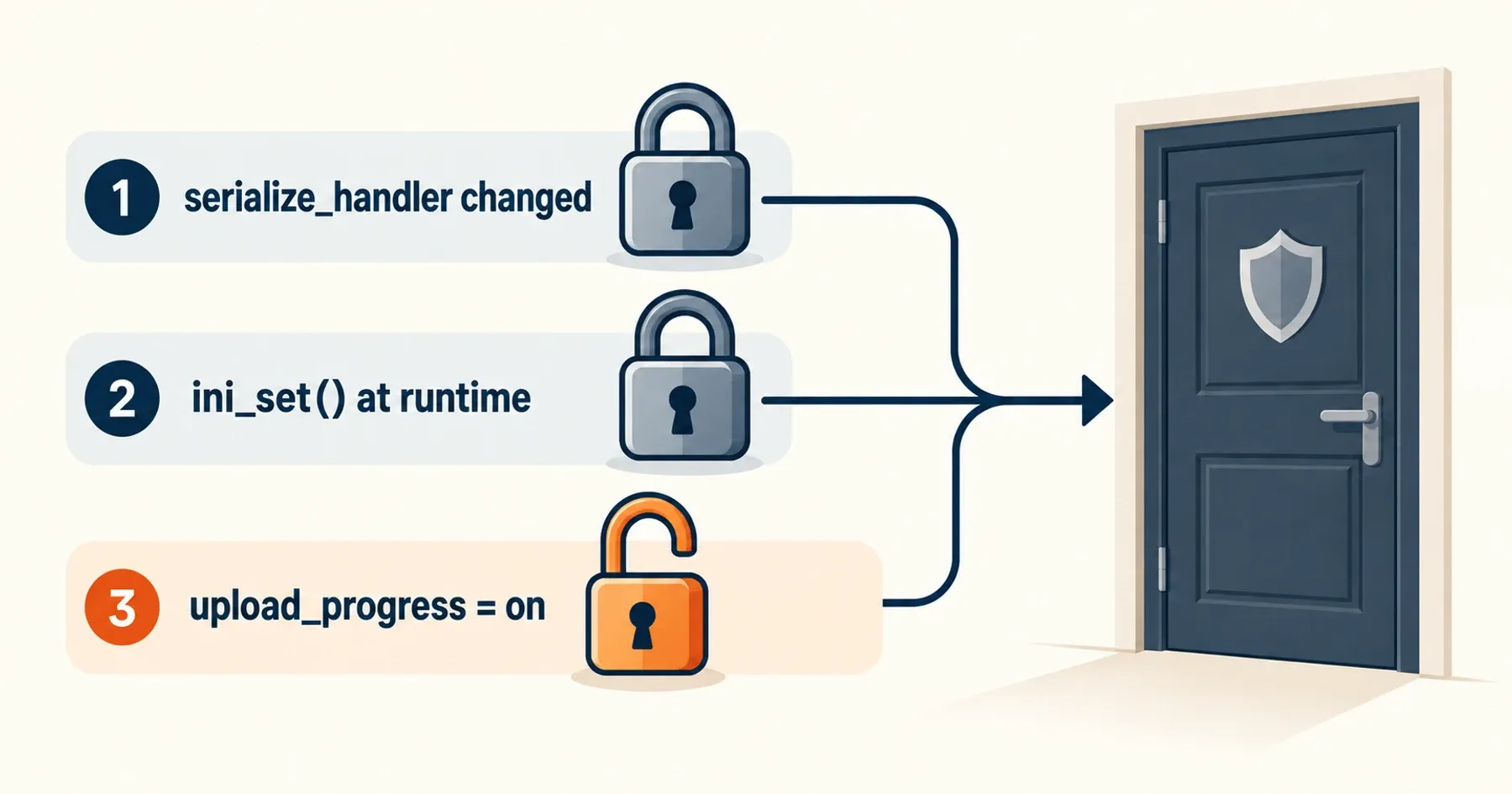
Upload progress tracking (condition 3) is what powers progress bars that show how much of a large file has been uploaded.5 The PHP manual says it "Defaults to 1, enabled", so it's true on most servers.5 That's why the fix is to turn condition 3 off.

Jeensuk's takeConditions 1 and 2 only exist if someone changed them on purpose. Your job is to lock number 3.
How do I check whether my site is affected?
Look at two server settings and one thing in the site's code. On a VPS or droplet, read the values the web server actually uses (a phpinfo() page served through the site, or the PHP-FPM pool config). Running php -i on the command line reads the CLI configuration, which can be a different file.
- Setting for condition 1: what session.serialize_handler is set to (the default is php).
- Setting for condition 3: whether session.upload_progress.enabled is 0 (off) or 1 (on).
- Code for condition 2: search the site's files and config for code that changes "serialize_handler" at runtime. Astra Security recommends the same search.6 If nothing turns up, condition 2 doesn't apply.
If a host, agency or managed WordPress provider runs PHP for you, you can send them this as-is:
On WordPress, Tools → Site Health gives one more clue. If a PHP session is open, WordPress flags it as critical: "An active PHP session was detected". The reason it gives is "This interferes with REST API and loopback requests."7 But that test only looks at the request Site Health makes from the admin screen. No warning means no session was open at that moment, not that no plugin ever opens one on a public page.

Jeensuk's takeAsking isn't rude. If the answer is "already done," you're finished with this one.
What is the one setting that closes it?
Set session.upload_progress.enabled to 0, then restart PHP. The PHP team's October 21 advisory and Hostinger's notice describe the same step: turn it off in php.ini or your PHP-FPM pool config, then restart all PHP workers.8·9
| Do | Don't |
|---|---|
| Set it to 0 somewhere that applies before a request is handled: php.ini, the PHP-FPM pool config (for example php_admin_flag), or the server config | Rely only on ini_set() in the code or on FPM's .user.ini |
| Restart every PHP worker after the change | Leave PHP running without a restart (the old setting stays in effect) |
The "Don't" column comes from the PHP team's October 21 advisory on PHP2Shell (CVE-2026-109619): "Do not rely on ini_set() or FPM .user.ini."8 The manual lists this setting as changeable only per directory or in php.ini, so ini_set() can't change it anyway.5 If you made this change for PHP2Shell, leave it as it is. There's nothing more to do.1
If you applied it then, keep it in place and no further action is needed. — The PHP team, informational advisory, October 23, 2026
Know what turning it off changes. If your site built a file upload progress bar on this feature, that bar may stop moving.5 The manual itself suggests turning it off where you don't use upload progress bars.5 Company websites rarely use one, but if your contact form takes attachments, upload a test file after the change.

Jeensuk's takeOne line of config, one test upload. That's the whole job.
What if my site is on a VPS, a hosting plan or WordPress?
On a VPS or droplet, it's on you. DigitalOcean's shared responsibility model says "you secure the operating system (OS) you install on your droplet", and that includes PHP and its configuration.10 If you're not sure who looks after your server, read our article on PHP sites on a VPS or your own server first.
A few providers have said what they did. Hostinger says "Every Hostinger hosting plan except VPS is already fully protected"; VPS customers make the change themselves.9 xCloud says the setting was "applied to all xCloud servers, Managed and Self-Managed, on 21 October 2026".11 Cloudflare's firewall rules block known attempts, but only while the upload progress field keeps its default name.2 As of October 26 we couldn't find a notice about this CVE from DigitalOcean, Bluehost, SiteGround, WP Engine or Kinsta. That doesn't mean they did nothing. It means you should ask, using the message in section 03.
WordPress itself treats an open session as a problem.7 Whether a plugin or custom code uses sessions depends on the site, though. So rather than assuming "it's WordPress, so we're fine," turn off condition 3.

Jeensuk's takeDon't fill the gaps with "probably fine." One line of config makes you safe even when you don't know.
What should I do when the fix ships, and how do I keep up with the warnings?
When the fixed release ships, upgrade PHP to it. The PHP team says it will publish a full advisory with the next release.1 On a distro package, check the package changelog, not just the version number: Ubuntu, for example, shipped its PHP2Shell fix as package 8.3.6-0ubuntu0.24.04.13 rather than as PHP 8.3.36.12
Why hasn't this shown up in your CISA feed? CISA's October 21 alert (revised October 23) covers only the two PHP2Shell CVEs, and CVE-2026-115560 isn't in its Known Exploited Vulnerabilities catalog.13·14 No exploitation in the wild had been reported as of October 26. Several GitHub repositories claiming lab proofs of concept did appear from October 23, and Brandefense notes it has not verified them.15 Don't download or run code like that on your server to test it.
And PHP news won't stop here. Security support for PHP 8.2 ends on December 31, 2026, and after that even fixes like this one stop coming.3 What to do for each version is in our article "PHP 8.2 support ends Dec 31: what to decide now".
Jeensuk's takeThe warnings will keep coming. The best way not to be caught off guard is to decide now who does what.
Frequently asked questions about the PHP session vulnerability (CVE-2026-115560)
I installed the October 21 PHP update. Do I have to do something again?
The update alone doesn't close this one. If you also set session.upload_progress.enabled=0 at that time, there's nothing more to do.
Will turning the setting off break my website?
Most company websites won't notice. Only a file upload progress bar built on this feature may stop moving, so test a file attachment once after the change.
My site runs WordPress. Is it affected?
WordPress itself treats an open session as a problem, but plugins and custom code vary from site to site. If you can't check, turning the setting off is the simpler and safer choice.
SOURCES
- PHP "Informational advisory: Session upload progress" (October 23, 2026) php.net
- Cloudflare "Cloudflare deploys protections against php2shell vulnerability" (October 21, 2026, October 23 update) cloudflare.com
- PHP "Supported Versions" and release list (checked October 26, 2026) php.net
- AHRQ PSNet "Alert Fatigue" (checked October 26, 2026) psnet.ahrq.gov
- PHP Manual "Session Upload Progress" and "Runtime Configuration (Sessions)" (checked October 25, 2026) php.net
- Astra Security "CVE-2026-115560: Another PHP Session-Handler RCE" (October 23, 2026, updated October 24) getastra.com
- WordPress Developer Resources "WP_Site_Health::get_test_php_sessions()" (checked October 25, 2026) wordpress.org
- PHP "Security advisory: Critical remote code execution vulnerabilities, update now" (October 21, 2026) php.net
- Hostinger "Hostinger deploys protections against php2shell PHP vulnerabilities" (October 21, 2026, October 23 update) hostinger.com
- DigitalOcean "Shared Responsibility Model" (checked October 25, 2026) digitalocean.com
- xCloud "CVE-2026-115560: What PHP's Session Upload Progress Advisory Means for Your Sites" (October 23, 2026) xcloud.host
- Ubuntu Security "CVE-2026-109619" (USN-8948-1, October 21, 2026) ubuntu.com
- CISA "Critical Vulnerabilities in PHP Require Immediate Patching" (October 21, 2026, revised October 23) cisa.gov
- CISA Known Exploited Vulnerabilities Catalog (catalog version 2026.10.23) cisa.gov
- Brandefense "CVE-2026-115560: PHP Session RCE Flaw" (October 23, 2026) brandefense.io
What's still left after the updates, in order. More English editions are on the way.
- Patched, but still not safe? Three cases
- PHP vulnerability, October 2026: is CVE-2026-115560 a risk? (this article)
- A back door left on your site? A web shell self-check (coming soon)
- PHP 8.2 support ends Dec 31: what to decide now
To understand what went wrong, start with risk series part 1, "What is PHP2Shell?" More articles on the ATATAKAI Digital blog.
Want the next PHP advisory to be someone else's evening?
Tell us how your site is hosted and who patches it today. We'll tell you whether it's worth keeping PHP and patching it yourself, handing the patching off, or moving the site to a setup with no PHP to patch. If keeping what you have is the right call, we'll say so.
Talk to ATATAKAI DigitalWant a quick outside view first? Run the free 30-second check

Updated Oct 26, 2026