Is my website secure? 3 emails to send your web designer
Is my website secure? Copy these 3 emails for your web designer and host. Ask about PHP, the October 21 fix and backups, then read the replies.
 By Jeensuk Yang
PHPFree · Web security · Email templates
?Who this is for
- You heard about a "PHP" security problem in October and wondered if your website is affected
- Someone else built your site, and you don't have the login
- Your web designer says "it's fine," and you'd like to know what "fine" means
!What you'll learn
- Three short emails you can copy and send today
- What to say if you call or chat with your web host
- How to read the replies: nothing to do, plan ahead, or act now

You don't have to understand the engine to ask the mechanic three questions.
When your truck goes in for service, you don't need to know how fuel injection works. You ask: What did you check? What did you fix? When should I come back? Your website runs on an engine too. It's called PHP, and it works behind the scenes, under WordPress.
In October, that engine needed an urgent fix. You can't check it yourself without a login, and you don't need to. This article gives you three short emails to send the people who can, and a way to read what comes back.
Is my website secure, and why should I ask my web designer about PHP now?
On October 21, 2026, the PHP project released versions 8.5.12, 8.4.27, 8.3.36 and 8.2.35, which "fix two critical vulnerabilities that can allow unauthenticated remote code execution."1 In plain words: a stranger could make an unpatched server run their own code. The issue became known as PHP2Shell.
The fix lives on the server, not in WordPress. Malwarebytes put it simply: "Updating WordPress or its plugins is not the same as updating PHP."2 Newsweek noted that the responsibility to fix it "falls on website operators, hosting providers and organizations running affected PHP installations."3 That's your web designer or your host, so the way to find out is to ask them.
Asking is not an accusation. The Federal Trade Commission's advice to small businesses lists exactly this question for a web host:4
Will you keep software updated? If it's my responsibility, how do I do that? — Federal Trade Commission, "Cybersecurity for small business: Hiring a web host"
And there's no need to panic. As of October 23, CISA said it "has not observed successful exploitation of these vulnerabilities in the wild."5 Cloudflare, meanwhile, said it had "observed attack traffic targeting our customers."6 Calm, but not careless, is the right speed.

Jeensuk's takeMost owners who ask will hear "already done." Asking is how you get to hear it.
Who is responsible for my website's security: my web designer or my host?
Usually both, in layers. Your host runs the server. Your web designer often holds the hosting account and the WordPress login.
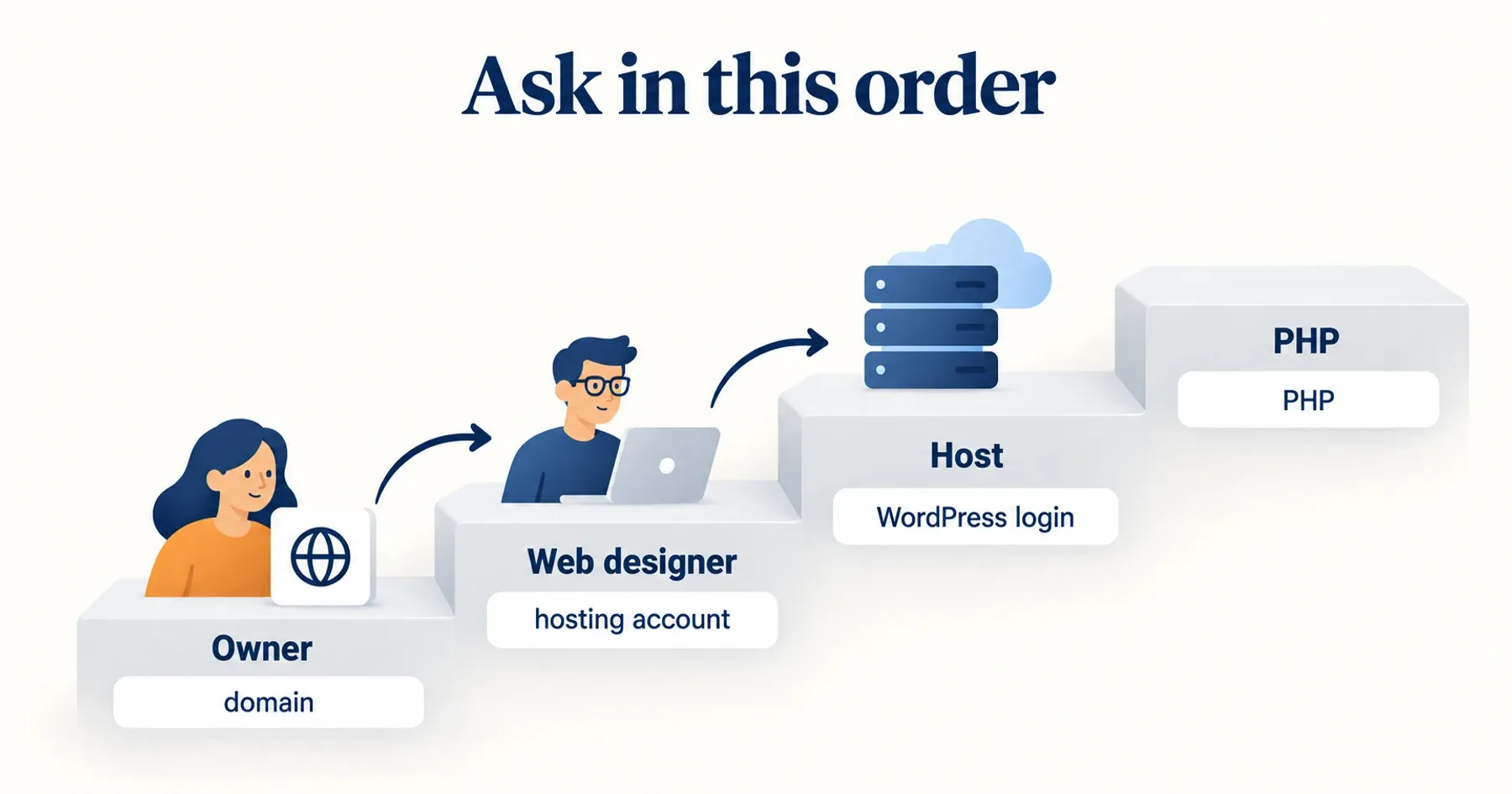
Start with the designer who built the site. Even Bluehost's own help pages say "The developer who initially built your site is likely to have the expertise needed to address the issue promptly and effectively."7
There's a practical reason too. Bluehost's contact page lists phone and chat, not a support email, and asks callers to have the account details ready.8 If the account is in your designer's name, the host may not be able to answer you directly. So email the designer first, and keep the host script in section 04 for later.
It matters to check with outside partners. Verizon's 2026 figures for small businesses say breaches with third-party involvement "now account for 48% of all breaches," and exploiting a vulnerability was the first step in 31% of them.9

Jeensuk's takeAsk in this order: the designer who built it, then the host who runs it. Don't skip straight to the host.
What exactly should I email my web designer?
Send three short emails, one question each, or put all three questions in one email if you prefer. Short works: Boomerang's study of millions of emails found the sweet spot is "between 50-125 words," and emails that ask "1-3 questions are 50% more likely to get a response."10 Replace the names in brackets and send.
Hope you're doing well. I saw news about a serious PHP security issue that was fixed on October 21 (it's being called PHP2Shell). Could you tell me which PHP version our website is running right now? Just the number is fine.
Thanks,
[Your name]
Following up on PHP. The PHP project released security fixes on October 21 (versions 8.2.35, 8.3.36, 8.4.27 and 8.5.12). Has the fix been installed on our site, not just scheduled? If our host took care of it, a quick "yes, on [date]" is all I need. And going forward, who updates PHP for us, you or the host?
Thanks,
[Your name]
One more housekeeping question. Where are our website backups kept, and what's the date of the most recent one? Could you send us a copy of the latest full backup (files and database) to keep on our side? If that costs anything, please let me know first.
Thanks,
[Your name]
Why email 2 asks about the fix and not only the version: Kinsta points out that "The PHP version displayed doesn't necessarily indicate whether a security patch has been applied," because some hosts add security fixes without changing the version number.11 Malwarebytes advises owners to ask providers to "confirm PHP fixes are installed, not just scheduled."2
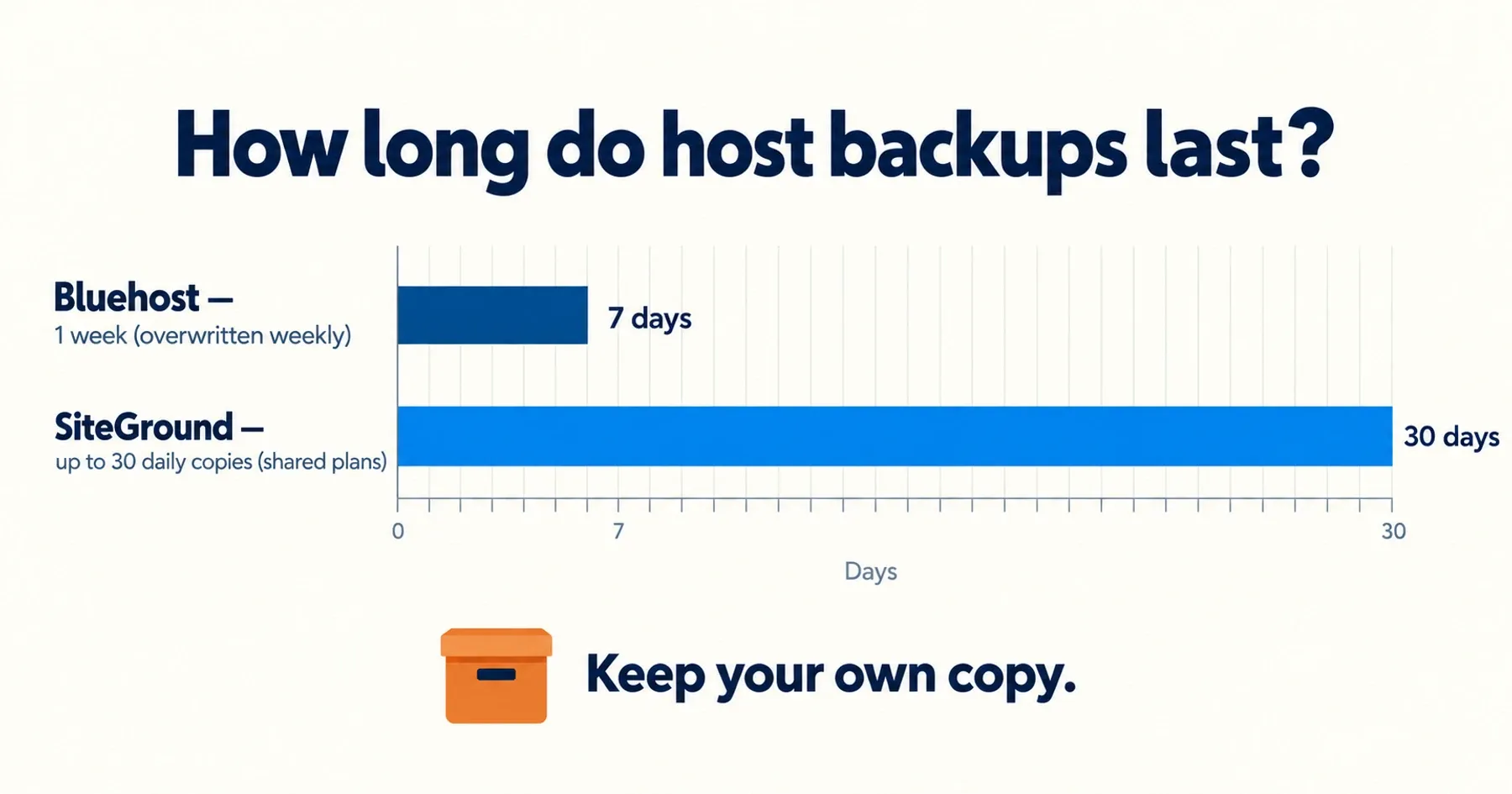
Why email 3 matters: host backups are often thinner than people think. Bluehost's automatic backup "runs once a week on a random day, and each run overwrites any previous backups. Only one week of backups is kept at a time." Bluehost also calls the service a "courtesy."12 Other hosts keep more. SiteGround keeps "up to 30 daily backup copies" on shared hosting.13 WordPress's own guidance says a backup has two parts, "Database and Files," and should always be made before an upgrade.14

Jeensuk's takeEmail leaves a written record. Months from now, "who said they'd update PHP" won't be a matter of memory.
What should I say if I call or chat with my web host?
If your designer doesn't reply, or the hosting account is in your name, contact the host directly. Read these three sentences in the chat window or over the phone.
If the host says the account belongs to someone else, that's useful too. It tells you who holds your keys, and that's worth sorting out. Our article on the five website keys every business owner should hold walks through it.

Jeensuk's take"Whose name is the account in?" is a security question too. The answer decides who can fix things in a hurry.
How do I read the replies I get back?
Sort each reply into one of three boxes. You don't need to understand every word, only which box it falls in.
| Reply says | What it means | What to do |
|---|---|---|
| 8.3.36, 8.4.27, 8.5.12 or newer. Or "the host applied the fix on [date]." Or "we're on managed hosting and the host handled it." | Nothing to do. Some managed hosts said publicly that customers needed no action. Hostinger, for example: "no action is needed" except on VPS plans.15 | Save the email. You're done. |
| 8.2.35, or "we'll check and get back to you." | Fixed for now, but PHP 8.2 "reaches end of life on 31 December 2026," and fixes stop after that.1 | Ask what the plan is before December 31, and when you'll hear back. |
| 8.1 or older. Or "I don't know." Or no backup copy exists. | Versions 8.1 and older get no more fixes from the PHP project, which tells users to "contact your vendor for details, or upgrade to a supported version."1 | Act now. Ask for a date to upgrade, and get a backup copy first. |
A lower version number with "the fix is applied" can still be fine, for the reason in section 03. When in doubt, ask for the date the fix was applied.

Jeensuk's takeThree boxes, not thirty terms. If you can sort the reply, you've done your part.
What if I get no reply, or a vague one?
Give it two business days, then pick up the phone. People who ignore email often answer a call. If the reply is just "it's fine," send email 2 again and ask for the date.
Watch out for the opposite problem too. UHY, a US accounting and advisory firm, warns about phishing messages that use an "urgent PHP update" as bait.16 If an email you didn't ask for urges you to log in or pay for a PHP fix, don't click. Contact your designer or host the way you normally do.
If your designer has stopped answering altogether, read "Lost touch with your web developer? Get your site back". If your host sent you its own PHP notice, "Got a PHP email from your web host? How to read it" explains the wording.

Jeensuk's takeA vague answer isn't a bad answer yet. It's a reason to ask one more, more specific, question.
Frequently asked questions about emailing your web designer about PHP
Won't my web designer feel accused?
Not if you ask plainly. The FTC lists these same questions for small businesses to ask, and a good designer will be glad you're paying attention. You can even say you're asking because of the October news.
I don't have any login to my own website. Is that a problem?
It's common, but it's worth fixing. Ask your designer whose name the hosting account and domain are in, and whether you can have your own login. That way someone at your company can act if the designer is unavailable.
Can't I just check the PHP version myself?
With a WordPress login, yes: Tools → Site Health → Info → Server shows the PHP version. Without one, the version is usually hidden, which is why these emails ask the people who have access.
SOURCES
- PHP "News Archive 2026": security advisory and release announcements (October 20–21, 2026) php.net
- Malwarebytes Labs "PHP2Shell: Why many websites had to go offline" (October 21, 2026) malwarebytes.com
- Newsweek "PHP vulnerability sparks scramble as major websites face threat" (October 2026) newsweek.com
- FTC Business Blog "Cybersecurity for small business: Hiring a web host" (February 15, 2019) ftc.gov
- CISA "Critical Vulnerabilities in PHP Require Immediate Patching" (October 21, 2026, revised October 23) cisa.gov
- Cloudflare "Cloudflare deploys protections against php2shell vulnerability" (October 21, 2026, October 23 update) cloudflare.com
- Bluehost "What to do if my Site Does Not Support Newer Versions of PHP" (updated July 11, 2026) bluehost.com
- Bluehost "Contact" (checked October 26, 2026) bluehost.com
- Verizon Business "Cybersecurity insights for SMBs" (2026 DBIR) verizon.com
- The Boomerang Blog "7 Tips for Getting More Responses to Your Emails (With Data!)" (February 12, 2016) boomerangapp.com
- Kinsta "PHP2Shell: How Kinsta protected WordPress sites" (October 23, 2026) kinsta.com
- Bluehost "How Often Does Bluehost Back Up My Site?" (updated August 16, 2026) bluehost.com
- SiteGround "How to use the Backup service in Site Tools?" (May 13, 2026) siteground.com
- WordPress Developer Resources "Backups" (October 14, 2026) wordpress.org
- Hostinger "Hostinger deploys protections against php2shell PHP vulnerabilities" (October 21, 2026, October 23 update) hostinger.com
- UHY "PHP2Shell: A Critical Web Security Threat Organizations Need to Address Now" (October 21, 2026) uhy-us.com
For owners who didn't build their own site. More English editions are on the way.
- Is my website secure? 3 emails to send your web designer (this article)
- Got a PHP email from your web host? How to read it
- The five website keys every business owner should hold
- Lost touch with your web developer? Get your site back
To understand what went wrong, start with risk series part 1, "What is PHP2Shell?" More articles on the ATATAKAI Digital blog.
While you wait for a reply, see what your site shows from the outside.
Enter your website address. In 30 seconds you'll see whether it runs on PHP and what kind of server it's on. No login, no install, no password. Most sites need no action, and this check just helps you confirm it.
Run the free 30-second checkGot a reply you can't make sense of? Forward it to us and we'll read it with you

Updated Oct 26, 2026